
I looked at four "best Salesforce integration tools 2026" listicles. MuleSoft was in all four. Workato in three. Native managed-package platforms in zero. That gap is the article.
TL;DR: Salesforce integration tools split into three categories that solve different problems. iPaaS (MuleSoft, Workato, Boomi). ETL and data (Informatica, Matillion, Coefficient). Native managed-package platforms (Appnigma AI). The average enterprise runs 897 apps and integrates 29% of them (MuleSoft 2025 Benchmark), so picking the right category matters more than picking the right brand.
Why the category matters more than the brand
Three different jobs. Three different categories. Most listicles hand you a single ranked list and let you sort it out.
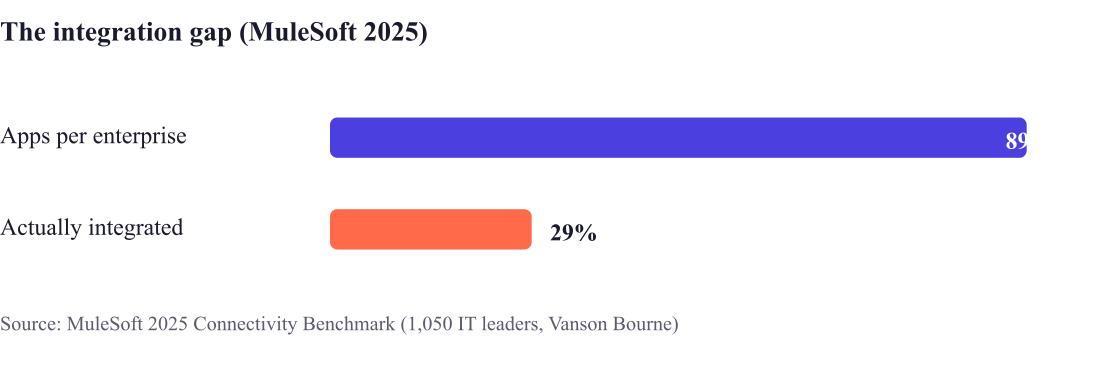
That gap isn't a tooling shortage. It's a category-fit problem. Teams buy a data tool when they needed orchestration. Or they bolt on middleware when their product needed to be native. Get the category right and the brand choice basically picks itself.
Category 1: iPaaS and middleware
Connecting Salesforce to other SaaS apps and orchestrating workflows across them. Reach for this when you've got many internal systems that need to talk to each other in real time.
Category 2: ETL and data integration
Moving, transforming, and syncing data between Salesforce and a warehouse. Reach for this when the job is reporting, analytics, or consolidating data, not running live workflows.
Category 3: native managed-package platforms
For SaaS vendors whose product has to run natively inside customers' Salesforce orgs, not just exchange data with them. This is the category every generic listicle skips, and it's the one ISVs actually need.
→ Appnigma AI generates an AppExchange-ready managed package from a plain-language description. Your product gets real-time bidirectional sync and a native UI inside the customer's org. No Salesforce developers. No multi-month build.
A native managed package isn't really the same kind of thing as the other two categories. It's your product, living inside Salesforce, distributed through the AppExchange. Not a pipe moving data between your product and Salesforce. That distinction sounds small. It decides enterprise deals.
How to choose: a decision matrix
The category, not the brand, decides whether the integration succeeds. Match your job to the row.
| If you need to... | Category | Runs where | Who owns credentials | Examples |
|---|---|---|---|---|
| Orchestrate across many systems | iPaaS / middleware | Outside Salesforce | You / IT | MuleSoft, Workato, Boomi |
| Move or warehouse data | ETL / data | Outside Salesforce | You / data team | Informatica, Matillion, Coefficient |
| Ship your product inside customers' orgs | Native managed package | Inside Salesforce | The customer's org | Appnigma AI |
The most expensive mistake I see: an ISV using iPaaS to bolt a product onto Salesforce when the product really needs to be native. iPaaS makes data move. It doesn't put your product, with its own UI and the customer's own security-review coverage, inside the org.
Why native beats API-only for ISVs
API and middleware integrations sit outside Salesforce. A native managed package lives inside the customer's org. Real-time bidirectional sync. Native UI. The security review enterprise buyers expect during procurement. Salesforce reports that more than 90% of its customers run at least one AppExchange app (Salesforce). Native presence is increasingly the thing deciding enterprise deals.
There's a procurement angle here too. A native managed package installs under the customer's existing Salesforce agreement and inherits the security review Salesforce already mandates. An external integration often triggers a fresh security assessment from the buyer's IT team. That adds weeks to the sales cycle. Native isn't only easier to engineer. It's easier to buy.
Native used to mean hiring Salesforce developers. Appnigma generates the managed package and prepares it for the security review, removing the engineering dependency that kept smaller ISVs stuck on API-only.
When NOT to use each category
Knowing when a category is wrong is as useful as knowing when it fits.
Are you connecting systems (iPaaS), moving data (ETL), or shipping a product into someone else's org (native)? Pick from that question, not from a SERP listicle.
What integration tools cost
Pricing varies a lot by category, and most vendors don't publish list prices. Directional ranges: MuleSoft starts around $80,000 a year, Workato around $10,000 a year, Boomi from roughly $5,000 per connector per year. Enterprise programs can run $100,000 to $2,000,000+ (Software Pricing Guide, 2026). ETL and data tools span free tiers (Coefficient, Airbyte) through seven-figure enterprise contracts. Native managed-package generation is typically a subscription, replacing the $25,000 to $150,000+ custom build.
Treat any vendor pricing as a starting point for negotiation, not a quote.
How to evaluate a Salesforce integration tool
Once you've got the category, judge specific tools on criteria most listicles skip.
Feature checklists rarely separate winners. These operational criteria do.
Frequently Asked Questions
What is the best Salesforce integration tool?
There isn't a single best one, because the three categories solve different problems. For connecting apps, MuleSoft or Workato. For data movement, Informatica or Coefficient. For shipping your product as a native Salesforce app, a managed-package platform like Appnigma.
What is the difference between iPaaS and a native managed package?
iPaaS runs outside Salesforce and orchestrates data between systems. A native managed package runs inside the customer's org, with its own UI, and inherits the customer's security-review coverage. ISVs distributing a product to customers need the native model.
Is MuleSoft the best Salesforce integration tool?
MuleSoft is a strong enterprise iPaaS for complex API integration, with entry pricing around $80K/year. It's not built for distributing a native app into customers' orgs. That's a managed-package use case, a different category.
What is the difference between ETL and iPaaS for Salesforce?
ETL moves and transforms data, usually into a warehouse for reporting. iPaaS orchestrates live workflows and API calls between systems. ETL answers "where does my data go." iPaaS answers "how do my systems act on each other."
Can I build a native Salesforce integration without code?
Yes. Appnigma generates an AppExchange-ready managed package from natural language, with no Apex or Lightning Web Component work required.
Which integration tool is best for an ISV or SaaS startup?
If your product needs to run inside customers' Salesforce orgs, a native managed-package platform is the right category. iPaaS and ETL tools are for connecting or moving data, not for distributing your product.
About the author. Sunny Chauhan is the founder and CEO of Appnigma AI, a no-code platform that generates Salesforce AppExchange-ready managed packages. He helps SaaS teams pick the right integration category for their go-to-market.
Key takeaway
Salesforce integration tools split into three categories: iPaaS (MuleSoft, Workato, Boomi) for orchestration, ETL and data tools (Informatica, Matillion, Coefficient) for data movement, and native managed-package platforms for shipping a product inside customers' orgs. Appnigma AI is the native option, generating an AppExchange-ready managed package from natural-language prompts so SaaS products run inside Salesforce with real-time sync.
Related Articles
- Salesforce integration partner
- What is a managed package in Salesforce
- How to build a managed package without a Salesforce developer
- Salesforce AppExchange development company and services
Sources
- MuleSoft 2025 Connectivity Benchmark Report
- Salesforce press release, Informatica acquisition, 2025
- Software Pricing Guide, iPaaS pricing 2026 (directional ranges)
What category were you in last time you bought one of these?