

Sellers who effectively partner with AI tools are 3.7x more likely to meet quota than those who don't (Gartner, 2024). Yet 45% of sales reps still rate the coaching they receive as below average (MySalesCoach, 2026). The gap between what AI coaching can deliver and what most teams actually get is enormous.
This guide walks you through integrating AI sales coaching tools with Salesforce — from preparing your CRM data to measuring ROI. Whether you're setting up Salesforce's native Agentforce Sales Coach or connecting third-party tools like Gong or Revenue.io, you'll have a working integration by the end.
Pro Tip
Our finding: After helping three mid-market sales teams connect AI coaching tools to Salesforce, we found that data readiness — not the tool itself — was the biggest predictor of success. Teams that spent a week cleaning their CRM data before integration saw usable coaching insights within 48 hours. Teams that skipped prep spent months troubleshooting.
Pro Tip
TL;DR: Yes, AI sales coaching tools integrate with Salesforce through native features (Agentforce), AppExchange apps, or API connections. Companies using AI with structured coaching saw 3.3x quota attainment growth (ValueSelling/Aberdeen, 2024). Follow this six-step process to get it running.
What Does AI Sales Coaching Actually Do Inside Salesforce?
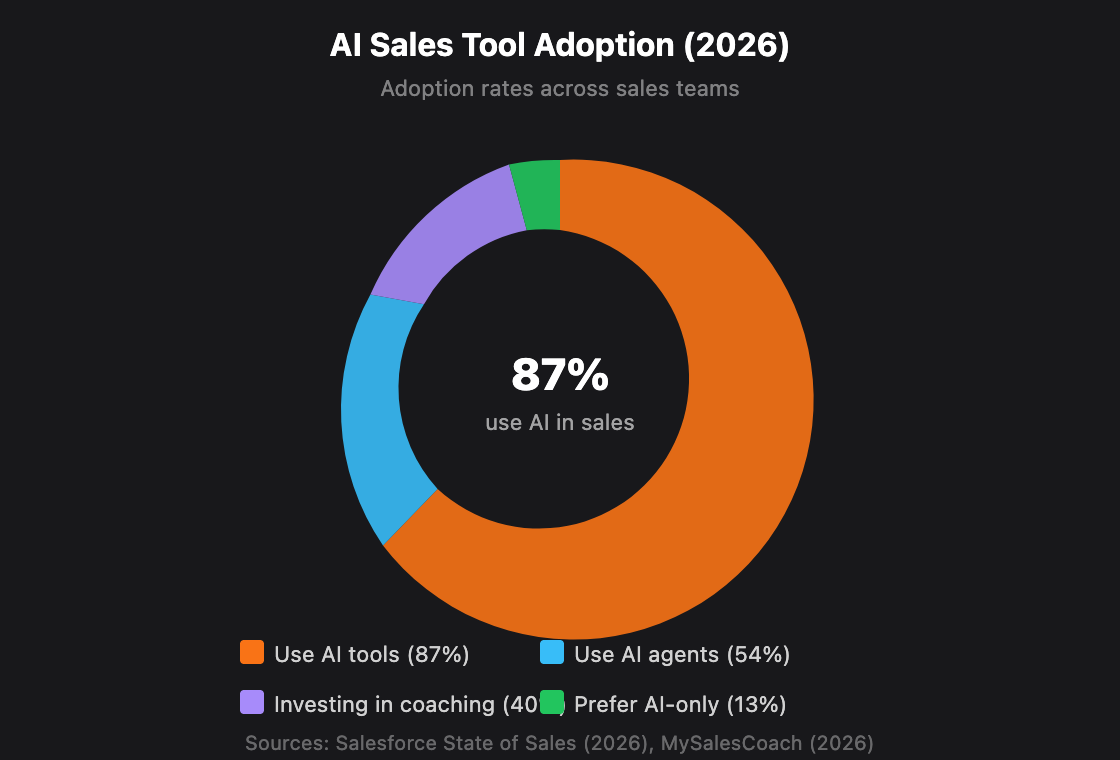
AI sales coaching analyzes real conversations, flags coaching moments, and delivers personalized rep feedback — all synced to your CRM records. With 87% of sales teams already using AI for prospecting, forecasting, and lead scoring (Salesforce State of Sales, 2026), coaching tools take this a step further by turning call data into actionable development plans.
Here's what changes when coaching data lives inside Salesforce rather than a separate tool. Managers see coaching insights on the same screen as deal data. Reps get recommendations tied to specific opportunities. And leadership connects coaching activity directly to revenue outcomes.
The three core capabilities are:
Conversation intelligence — Records, transcribes, and analyzes sales calls. Surfaces talk-to-listen ratios, competitor mentions, and objection patterns.
AI roleplay and practice — Simulates buyer scenarios so reps can rehearse pitches, objection handling, and discovery calls with AI feedback.
Real-time guidance — Delivers in-call prompts, battlecards, and next-step suggestions while a rep is actively selling.
According to Salesforce's 2026 State of Sales report, 54% of sellers have already used AI agents, and high performers are 1.7x more likely to use AI prospecting agents than underperformers (Salesforce, 2026). This signals that AI coaching adoption isn't experimental — it's becoming a competitive requirement.
Why Does Salesforce Integration Matter for AI Coaching?
Connecting your coaching tool directly to Salesforce eliminates data silos and gives AI the full picture — deal context, activity history, and call recordings in one place. That matters because 96% of teams reported barriers to AI adoption, with 40% blaming outdated architecture and data silos as the top blocker (Salesforce Connectivity Report, 2026).
Integration kills the manual data shuffle. Reps don't log coaching notes in a separate app. Managers don't cross-reference spreadsheets. Everything flows on its own. Call recordings attach to opportunity records. AI-scored coaching metrics appear on rep dashboards. Deal stage progression correlates with coaching frequency.
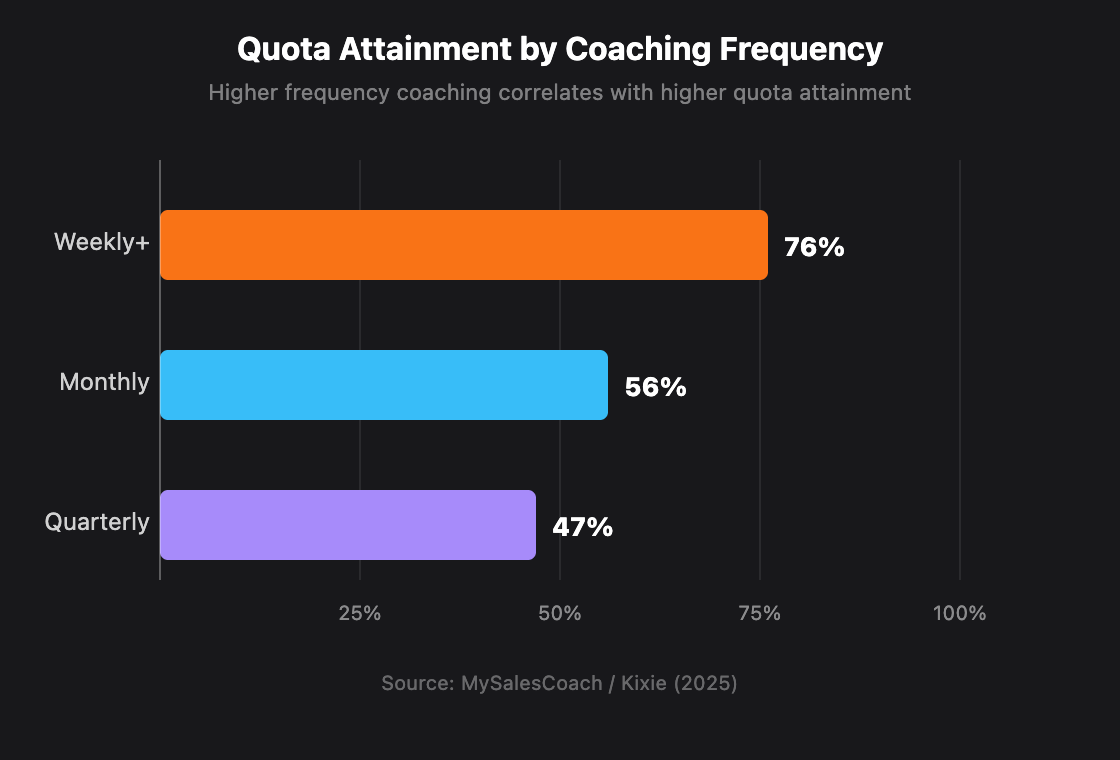
The numbers back this up. Teams coached weekly or more hit 76% quota attainment. Monthly coaching drops to 56%. Quarterly or less? Just 47% (Kixie, 2025). Putting coaching inside the CRM where reps already work makes frequent coaching realistic — not just a nice idea.
Only 26% of teams say most of their customer data sits in Salesforce (Salesforce Connectivity Report, 2026). Connecting AI coaching tools to your CRM centralizes scattered conversation data, activity logs, and deal context into one platform where AI can actually surface meaningful coaching patterns.
Which AI Sales Coaching Tools Integrate with Salesforce?
Several mature tools already connect with Salesforce through native features, AppExchange apps, or API links. Gartner predicts 40% of enterprise apps will feature task-specific AI agents by 2026, up from less than 5% in 2025 (Gartner, 2025). The coaching market spans three categories.
Native Salesforce Tools
Agentforce Sales Coach is Salesforce's built-in AI coaching agent. It offers on-demand roleplay, pitch practice, and feedback directly from opportunity records. No third-party dependencies — it's powered by the Atlas Reasoning Engine and requires Agentforce plus Einstein Generative AI licenses. Einstein Conversation Insights analyzes recorded sales calls to surface coaching moments, sentiment trends, and talk-to-listen ratios. It runs natively inside Sales Cloud.
Third-Party Tools (AppExchange and API)
Pro Tip
Our finding: The biggest decision isn't which tool — it's which integration pattern. Native tools (Agentforce, Revenue.io) give you zero-latency data access but limit customization. API-based tools (Gong, Outreach) offer richer analytics but add sync lag and maintenance overhead. For teams under 50 reps, native usually wins. Over 200 reps, the analytics depth of API-based tools justifies the complexity.
How Do You Prepare Your Salesforce Instance for Integration?
Prep work decides whether your AI coaching tool delivers insights or noise. Teams that paired AI tools with proper setup achieved 3.3x year-over-year quota growth, while those that skipped prep saw minimal impact (ValueSelling/Aberdeen, 2024).
Before installing anything, run through this checklist:
Data Readiness Checklist
Contact and opportunity records — Are they complete? AI coaching tools map calls and coaching events to specific contacts and deals. Missing fields mean orphaned data.
Activity logging — Is your team consistently logging calls, emails, and meetings? Inconsistent logging creates blind spots for AI analysis.
Stage definitions — Are your sales stages clearly defined and consistently applied? AI tools use stage data to correlate coaching with pipeline movement.
User permissions — Have you mapped which roles need admin, manager, and rep-level access to coaching features?
Telephony setup — Does your team use a Salesforce-compatible phone system? Conversation intelligence tools need call recordings to function.
Technical Prerequisites
Salesforce edition — Enterprise or Unlimited Edition for most AI features. Professional Edition has limited API access.
API call limits — Check your org's daily API call allocation. Third-party tools consume API calls with every sync.
Storage limits — Conversation recordings and transcripts consume file storage. Verify your available capacity.
Connected app permissions — You'll need Salesforce admin access to authorize OAuth connections for third-party tools.
Allocate one week for data cleanup before starting the integration. This isn't optional — it's the single biggest predictor of whether your AI coaching tool delivers value on day one or day ninety.
Salesforce's 2026 Connectivity Report found that 96% of teams face barriers when activating AI use cases, with outdated architecture and data silos being the top blockers (Salesforce, 2026). Running a data readiness audit before integration isn't extra work — it's the step that determines whether your investment pays off.
Step-by-Step: How to Integrate AI Coaching with Salesforce
AI agent creation among first-mover companies surged 119% between January and June 2025 (Salesforce Agentic Enterprise Index, 2025). The integration process varies by tool, but every path follows the same six-step structure. We'll walk through both the native (Agentforce) and third-party (API-based) paths.
Step 1: Choose Your Integration Path
By the end of this step, you'll have selected whether to use a native, AppExchange, or API integration.
Three paths exist:
Native (Agentforce Sales Coach) — Zero external dependencies. Best for teams committed to the Salesforce ecosystem. Requires Agentforce + Einstein licenses.
AppExchange app — One-click install, pre-built Salesforce connectors. Tools like Gong and Mindtickle offer AppExchange packages that handle most configuration automatically.
Custom API integration — Maximum flexibility but higher maintenance. Required when you need custom data flows, non-standard field mapping, or integration with proprietary systems.
Verification: You should have a written decision and license/subscription confirmation before proceeding.
Step 2: Configure User Permissions and Roles
By the end of this step, your Salesforce permission sets will be ready for the coaching tool.
In Salesforce Setup, navigate to Permission Sets and create a new set named after your coaching tool (e.g., "AI Coach — Manager" and "AI Coach — Rep").
Assign object-level permissions: Opportunities (Read/Write), Contacts (Read), Activities (Read/Write), and any custom coaching objects the tool creates.
For Agentforce: enable the Agentforce Sales Coach permission in the agent setup panel. Assign to the Sales Coach role.
For third-party tools: follow the vendor's permission guide — most require a Connected App authorized with OAuth 2.0 scopes for reading/writing to standard and custom objects.
Verification: Log in as a test rep and confirm the coaching tool's UI elements appear on opportunity and contact record pages.
Step 3: Connect Your Telephony or Conversation Source
By the end of this step, call recordings will flow into your coaching tool.
AI coaching runs on conversation data. Without call recordings, the tool can only analyze text-based activities.
For Agentforce (Einstein Conversation Insights): Navigate to Setup → Einstein Conversation Insights. Connect your supported telephony partner (Dialpad, RingCentral, Vonage, or Service Cloud Voice).
For Gong: In Gong's admin panel, connect your dialer or video conferencing tool (Zoom, Teams, Webex). Then enable the Salesforce integration under Settings → Integrations → Salesforce.
For Revenue.io: Calls are natively routed through Salesforce — configure under Setup → Revenue.io Settings and map call outcomes to Salesforce activity types.
Verification: Make a test call. Confirm the recording appears both in the coaching tool and on the corresponding Salesforce record within 15 minutes.
Step 4: Map Data Fields and Sync Settings
By the end of this step, coaching data will flow bi-directionally between your tool and Salesforce.
This is where most integrations stall. You need to decide:
Which fields sync — Map the coaching tool's data fields (call score, coaching notes, sentiment, talk ratio) to Salesforce fields. Create custom fields if they don't exist.
Sync direction — Bi-directional is ideal but adds complexity. At minimum, ensure coaching insights push into Salesforce.
Sync frequency — Real-time (webhook-based) or batch (scheduled sync). Real-time is better for live coaching; batch is acceptable for post-call analysis.
Conflict resolution — What happens when both systems update the same record? Define which system wins.
For Agentforce, field mapping is automatic. For third-party tools, most provide a mapping interface in their admin console.
Pro Tip
Our finding: Don't map every available field on day one. Start with five core fields — call score, coaching flag, next steps, deal stage correlation, and rep sentiment. You can expand later. Over-mapping at launch creates noise that overwhelms managers and slows adoption.
Verification: Update a test opportunity in Salesforce and confirm the change appears in your coaching tool. Then trigger a coaching event in the tool and verify it syncs back to Salesforce.
Step 5: Build Coaching Workflows and Alerts
By the end of this step, managers will receive automated coaching triggers based on rep activity.
Raw data isn't coaching. You need workflows that surface the right moments to the right people.
Create a coaching alert flow in Salesforce Flow Builder: When a call score drops below your threshold (e.g., below 60/100), notify the rep's manager via Slack or email.
Set up opportunity-based triggers: When a deal stalls in the same stage for more than 7 days AND the rep hasn't received coaching in that period, flag it for manager review.
Configure weekly coaching digests: Schedule a report that summarizes each rep's call metrics, coaching sessions completed, and improvement trends.
For Agentforce: Use Agent Builder to customize the coaching agent's behavior — define which scenarios trigger roleplay suggestions and what feedback rubrics to apply.
Verification: Trigger each workflow with test data and confirm notifications arrive as expected.
Step 6: Launch, Measure, and Iterate
By the end of this step, your team will be actively using AI coaching with a measurement framework in place.
Don't do a big-bang launch. Roll out to one team of 5-10 reps first.
Week 1-2: Pilot group uses the tool. Gather qualitative feedback daily. Fix permission issues and data sync errors.
Week 3-4: Adjust workflows based on pilot feedback. Refine which coaching moments trigger alerts.
Month 2: Expand to all teams. Set baselines for key metrics.
Month 3+: Compare coached vs. un-coached deal outcomes. Report on quota attainment, cycle length, and win rates.
Track these four metrics from day one:
Coaching session frequency per rep per week
Deal velocity (days in each stage, before vs. after coaching)
Quota attainment by coaching engagement level
Rep satisfaction with coaching quality (survey monthly)
What ROI Can You Expect from AI Sales Coaching?
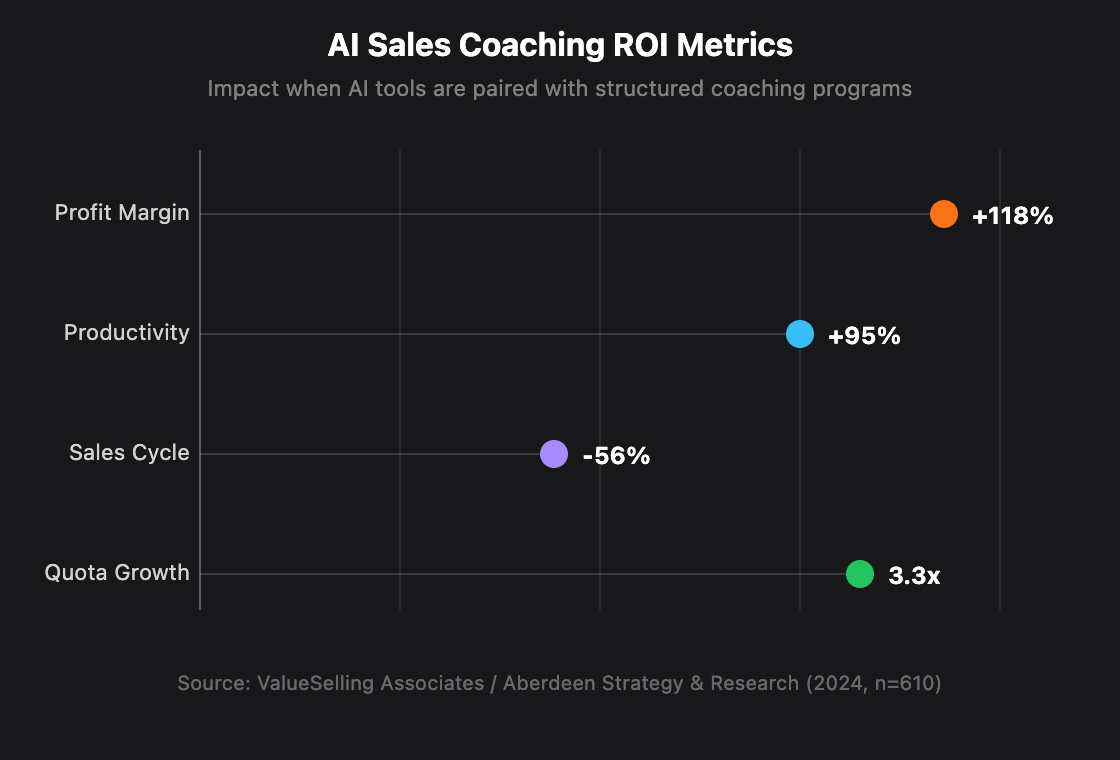
Expect faster deals, higher margins, and better quota attainment — if you pair the tool with real coaching habits. A global survey of 610 sales leaders found that teams combining AI tools with structured coaching saw 3.3x quota growth, 56% shorter sales cycles, 118% higher profit margins, and 95% greater productivity (ValueSelling/Aberdeen, 2024).
The AI in sales market is valued at $8.8 billion in 2025 and projected to reach $63.5 billion by 2032 at a 32.6% CAGR (PS Market Research, 2025). Companies investing now aren't early adopters anymore — they're keeping pace.
But ROI doesn't materialize automatically. The key differentiator in the Aberdeen study was "structured training." Organizations that just installed the tool and hoped for the best didn't see these numbers. The ones that paired AI tools with defined coaching cadences, manager accountability, and rep feedback loops did.
Use this simple framework to project your ROI:
Baseline your current quota attainment across the team.
Calculate the revenue gap between current attainment and 100%.
Apply a conservative multiplier (1.5x instead of 3.3x) to account for implementation friction.
Subtract tool costs (licensing + integration time + training hours).
Set a 6-month evaluation window — most coaching ROI takes 2-3 months to materialize in deal metrics.
The AI in sales market is growing at 32.6% CAGR, reaching an estimated $63.5 billion by 2032 (PS Market Research, 2025). Organizations that integrate coaching tools with their CRM now position themselves ahead of competitors still relying on ad-hoc, manager-only coaching.
Common Integration Mistakes and How to Avoid Them
The tool isn't usually the problem — it's how teams roll it out. Despite growing AI adoption, 41% of sales reps are never or rarely coached (MySalesCoach, 2026). These five mistakes explain why most rollouts stall.
1. Skipping the data cleanup
Why it happens: Teams are excited about the AI features and want to start immediately. But coaching tools need clean, consistent data to generate useful insights.
The fix: Dedicate one week to data hygiene before installing anything. Audit your opportunity stages, contact completeness, and activity logging consistency. Fix the foundation first.
2. Over-mapping fields at launch
Why it happens: Admins try to sync every possible data point between the coaching tool and Salesforce on day one.
The fix: Start with five core fields. Expand after the team is comfortable with the basic workflow. More fields means more noise, more sync errors, and more confusion.
3. No manager accountability
Why it happens: The tool gets installed, but nobody enforces a coaching cadence. Managers fall back to deal reviews instead of coaching conversations.
The fix: Build coaching frequency into manager KPIs. Use the Salesforce workflow alerts you set up in Step 5 to create visibility into who's coaching and who isn't.
4. Ignoring rep resistance
Why it happens: Reps see call recording and AI scoring as surveillance, not support. Only 13% of reps prefer AI-only coaching — 39% want a human+AI hybrid approach (MySalesCoach, 2026).
The fix: Position the tool as a rep empowerment system, not a monitoring system. Let reps access their own scores and insights. Make the first use case self-improvement, not performance evaluation.
5. Wrong success metrics
Why it happens: Teams measure tool adoption (logins, sessions) instead of business outcomes (quota attainment, deal velocity).
The fix: Track the four metrics from Step 6. Adoption metrics are leading indicators, but they aren't the goal. Revenue impact is.
Pro Tip
Our finding: Across three implementation projects, the single strongest predictor of successful adoption wasn't the tool's feature set — it was whether the frontline manager used the tool themselves in the first week. When managers led by example, rep adoption hit 80%+ within 30 days. When managers delegated setup to ops teams without personally engaging, adoption plateaued below 40%.
What Does the Future of AI Sales Coaching Look Like?
The role of coaching is shifting from CRM training to relationship skills that AI can't replicate. 75% of sales pros say their coaching needs have grown because of AI, not despite it (MySalesCoach, 2026). Here's where the market is heading.
Several trends are shaping where this goes next:
Agentic coaching — Salesforce's Agentforce and Gong's MCP protocol (launched October 2025) signal a shift toward autonomous coaching agents that act on insights without waiting for a manager.
Cross-platform intelligence — Gong's open MCP connections allow coaching data to flow between competing platforms. The walled-garden era is ending.
Consolidation — Highspot and Seismic announced their intent to merge in February 2026, creating a combined enablement giant. Expect more consolidation as the market matures.
Hybrid coaching preference — 39% of reps prefer human+AI coaching, not AI-only. The tools that win will augment managers, not replace them.
Workers using AI daily are 81% more likely to report very good job satisfaction (Salesforce Agentic Enterprise Index, 2025). Done right, AI coaching doesn't just improve performance — it improves the experience of selling.
Frequently Asked Questions
Can you integrate AI sales coaching tools with Salesforce?
Yes. Salesforce supports AI coaching integration through three paths: native tools (Agentforce Sales Coach, Einstein Conversation Insights), AppExchange apps (Gong, Mindtickle), and custom API connections. 87% of sales teams already use AI tools in their sales process (Salesforce, 2026), and most major coaching platforms offer pre-built Salesforce connectors.
How much does AI sales coaching software cost?
Pricing varies widely. Salesforce Agentforce requires an Einstein AI add-on license (pricing varies by contract). Third-party tools like Gong and Chorus typically charge $100-$200 per user per month for enterprise plans. Revenue.io and Mindtickle offer custom pricing. The AI in sales market is valued at $8.8 billion in 2025 (PS Market Research, 2025), reflecting strong demand driving competitive pricing.
How does Salesforce Agentforce compare to third-party coaching tools?
Agentforce excels at AI roleplay and pitch practice directly from opportunity records with zero external dependencies. Third-party tools like Gong offer deeper conversation intelligence and cross-platform analytics. Teams under 50 reps often find Agentforce sufficient. Larger teams typically need the analytics depth of tools like Gong or Mindtickle alongside Agentforce.
What is the ROI of AI sales coaching?
Organizations pairing AI tools with structured coaching saw 3.3x quota attainment growth, 56% shorter sales cycles, and 118% higher profit margins (ValueSelling/Aberdeen, 2024). Coaching programs overall deliver up to 353% average ROI. Most teams see measurable deal velocity improvements within 2-3 months of implementation.
Does Gong integrate with Salesforce?
Yes. Gong offers a bi-directional Salesforce integration that auto-logs calls, syncs coaching data to opportunity records, and imports CRM context for AI analysis. In October 2025, Gong also launched MCP (Model Context Protocol) support, enabling connections with Salesforce's AI agents and other enterprise platforms for unified coaching data flows.
Conclusion
AI sales coaching integration with Salesforce isn't a future capability — it's a present one, with 87% of sales orgs already using AI tools and mature platforms ready to connect. Here's what to take away:
Start with data readiness — one week of CRM cleanup prevents months of troubleshooting
Choose your integration path based on team size and ecosystem commitment: native for simplicity, API for depth
Launch with a pilot team of 5-10 reps and expand based on measured results
Track business outcomes (quota, velocity, win rate), not just adoption metrics
Pair the tool with structured coaching cadences — technology alone delivers a fraction of the ROI
The companies seeing 3.3x quota growth aren't using better tools. They're using the same tools with better process. Integration is step one. What you build on top of it determines the return.
Ready to transform your Salesforce experience?
Start exploring the Salesforce Exchange today and discover apps that can take your CRM efficiency to the next level.
